
I wrote an article earlier regarding the bit transparent playback issue with PC (http://www.designwsound.com/dwsblog/?page_id=1607)
The article was incorrect, there is setting which makes PC iTunes bit perfect software even in high resolution playback. iTunes is based on QuickTime, and there is Quicktime – > Edit – > QT Preference – > Audio -> Audio Output.

You will need to match this output to your playback files. For example if you want to playback playback 24/96kHz, you will need to select 24bit/96kHz on this preference. **iTunes 9 adds support on WASAPI driver. This allows itunes by pass the k-mixer that may affect the bit transparency output. WASAPI was invented since Windows Vista, so if you are using Windows XP, you will see the same situation as below that the WASAPI option is grey out.
UPDATE: DEC2009 – I have tried on the new Windows 7 with iTunes 9 and WASAPI, but the iTunes does not automatically change sampling rates according to the file native rate.
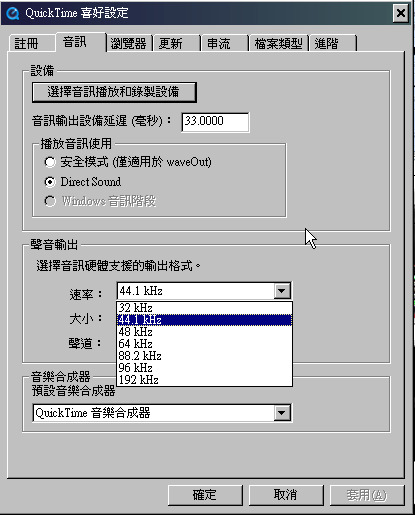
I have done the same bit transparent test and the result is once the QT preference setting matches with the iTunes playback resolution and sampling rate, the audio output is bit transparent. I have also tested using 24bit/192kHz setting to playback 24/96kHz files, the output is not bit transparent.


At least this is a good news that PC iTunes works the same as MAC version and allows bit transparent playback.