Home > Weiss Engineering > Weiss Engineering AFI1

Weiss Engineering AFI1

AFI1 Firewire to/from AES/EBU and ADAT Interface.

The AFI1 is a 24 channel Firewire Interface with 8 channels of bidirectional AES/EBU interfaces and 16 channels of bidirectional ADAT interfaces.

The AFI1 simultaneously supports the following conversions:

  • Firewire to AES/EBU (8 channels)
  • AES/EBU to Firewire (8 channels)
  • Firewire to ADAT ( 16 channels max.)
  • ADAT to Firewire ( 16 channels max.)

Features of the AFI1:

Inputs: Digital Audio inputs on Firewire (two connectors), XLR (AES/EBU), Toslink (ADAT, two connectors).

Outputs: Digital Audio outputs on Firewire (two connectors), XLR (AES/EBU), Toslink (ADAT, two connectors).

Sampling Rates: 44.1, 48, 88.2, 96, 176.4, 192 kHz. Number of ADAT channels at 44.1/48: 16, at 88.2/96: 8, at 176.4/192: 4.

Software: Drivers for Windows™ and OSX™ operating systems.

Power Supply: Supply range: 100..240V. Power consumption 10VA max.

Our first AFI1 arrived studio last week. When we open the box, usual swiss made high quality finishing and metal works, although not as exotics as the consumer audiophile thick anodized aluminum. The panel is minimal with just 3 LEDs – (1) Power (2) IEEE1394 and (3) Sync

AFI1 does not work only under IEEE1394 bus power, it needs AC Power connections. This is expected from highly regard as the highest end professional audio manufacturer. Setup is easy, install the software on PC or Mac, hook up the firewire cable and starts working.

The manual does not includes all information that you will want to know. It just shows you 2 screenshots (P.7-Mac/ P.8-PC) without telling you what those options are. But if you check out the DAC2/Minerva manuals, you will see the coverage. I’m sure Daniel will add those back on AFI1 manual soon.

Software selections:
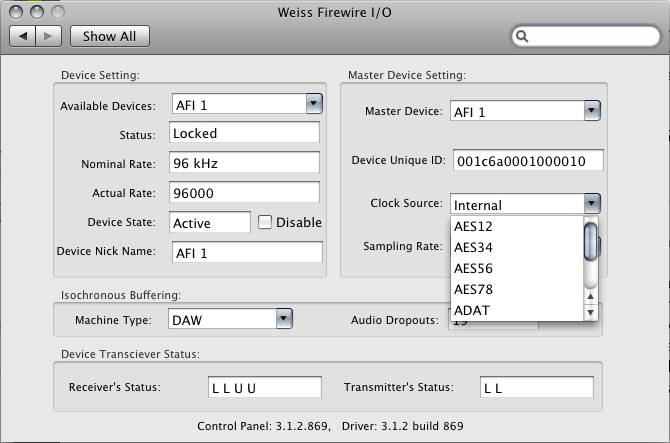
Available Devices: You can view a list of available device, if you have more than one AFI1

Master Device: You pick the Master Device, all other device will be sync to this Master Device Clock

Clock Source: You can select Internal, any pair of digital inputs or Wordclock input.
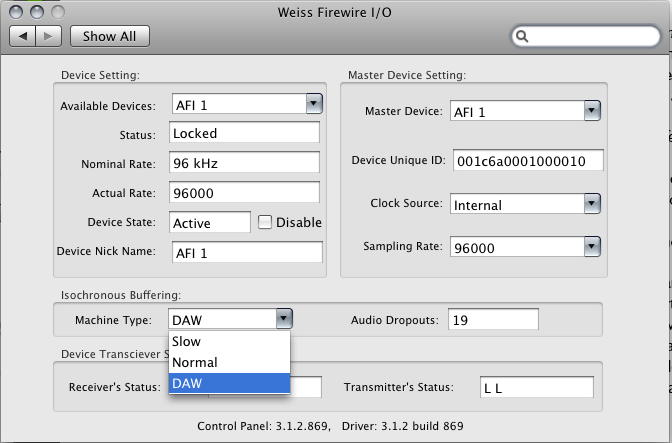

Isochronous Buffering – Machine Type:

This works only under MAC OS/X – There are 3 options here (1) Slow (2) Normal (3) DAW. This determines the latency/buffer in 3 separate settings. While DAW gives lowest latency, it demands the most from computer performance. The minimum roundtrip latency with an AFI1 was about 6.5ms, with the buffer delay in the application on the Mac which loops the audio minimized.

Windows Panel:

screenhunter_02-mar-19-1347

  • Master: If you have more than one device, here select which device to act as Master
  • Sample Rate: Current working sampling rate
  • Sync Source: Internal / AES input
  • Buffer Size In Samples: Larger buffer sizes increase robustness against dropouts, lower buffer sizes provide low latency.
  • Operation Mode: determines the stability of the system. For weak systems you should select Safe Mode Level 3. For lower latency Normal or Save Mode Level 1 can be selected.
  • Buffer Size In Samples: Larger buffer sizes increase robustness against dropouts, lower buffer sizes provide low latency.

screenhunter_03-mar-19-1348


Software upgrade wish:

The biggest different that I find between Weiss AFI1 and other soundcard GUI is, Weiss AFI1 does not provide any metering. This is a headache when we connect all cables and hear no sound. We have no way to see if the Weiss AFI1 is functioning or having wrong patching or routing under sound panel. I do wish there will be a software upgrade that allow us to see a metering on all 24 channels inputs / outputs. Of course it will be better if we can assign select channels to multiple outputs, plus hardware mixing feature. The software compares to Lynx or RME mixer is too minimal. I will strongly suggest at least a level meter on I/O. TCD2220 supports this on hardware level. Maybe Weiss wants to release a firewire based hardware 24ch I/O meter pack to chain with AFI1. However a simple software meter within Weiss panel will help a lot.

Well, in audiophile terms, the less function, the better sounding. How about the sound of AFI1?

Sound Quality

The best I heard from any sound card, period. First of all our mastering studio have all jitter-immune DACs from terrific Weiss DAC1-Mk2, dCS 954 and Crookwood Mastering Console DAC. We have both Mac and PC sound interface from RME digiface, Lynx AES16SRC, firewire devices MetricHalo 2D Expanded 2882 +DSP, ULN2 etc. I can proudly say jitter is not a concern here in our mastering room. However, I still feel that the sound from AFI1 is superior, especially in high sampling rate high resolution materials. To avoid goes into digital audio Vodoo, I will just want to have AFI1 in all my production from now on. The feeling is similar to last time when we hook up a Weiss Hydra-C between CD transport and DAC. ** Hydra-C and AFI1 uses completely different dejittering solution although they are both based on dual PLL scheme – jitter is suppressed in two stages. **

When almost 100% of all today recordings (even Vinyl!!) are made by DAW (digital audio workstation), there is no reason why using computer as source sounds inferior than CD transports. The historical audiophile digital myth will be out soon, if not already out. When looking at today digital media, all DVD-A, SACDs, Blu-ray disc, are not as effective and good as music file.

Weiss AFI1 is the ultimate bridge between computer and music playback/recording.


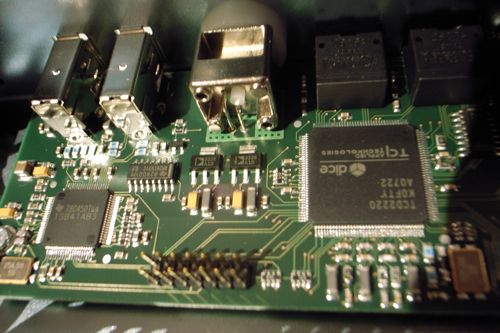
Inside 1: TC dice chip
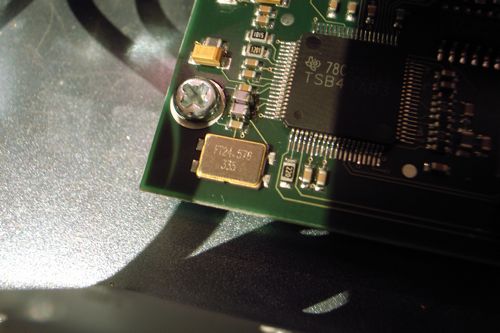
Inside 2: Very small size (compare the screw size) surface mount crystal


  • Share/Bookmark
Categories: Weiss Engineering
  1. Mani Sandher
    September 9th, 2008 at 02:47 | #1

    Hi, thanks for giving a more comprehensive overview of this product than the Weiss website provides!

    But tell me, do you know if the AFI1 is compatible with the dual-wire AES/EBU format?

    Thanks,

    Mani.

  2. September 9th, 2008 at 17:06 | #2

    Hello Mani,

    We can be called as Weiss asia center, and I would more prefer to provide end user perspective for people.

    Weiss just did a software update which supports dual wire at 176.4 or 192. The new AFI1 units will have DIP switches at the back where that mode is selectable.

  3. Mani Sandher
    September 11th, 2008 at 05:27 | #3

    Thanks for the confirmation – I have been waiting for such a product from Weiss for a long time… in order to replace my RME FF800 in my stereo hifi.

    I will be ordering my AFI1 from the UK distributor this week.

    Thanks again.

    Mani.

  4. September 11th, 2008 at 09:54 | #4

    You are welcome Mani. Remember to tell them you would like to buy the new one with that DIP switches.

  5. Tesh
    October 7th, 2008 at 03:01 | #5

    Hello from france.

    Can i use the AFTI1 like interface with my Mac book and record a session in logic audio.
    I have some focusrite préamp ( isa 428 X 2 ) . so i can use adat output directly in the AFTI1, and use Firewire in my macbook ?
    Sorry about my poor english.
    cause i have goods preamp I’m just looking for a good interface compatible with Mac os 10 and logic audio.

    Thanks
    TESH

  6. October 7th, 2008 at 12:47 | #6

    Hello TESH,

    AFI1 is exactly the interface for computer recording/playback. Yes you can connect the ISA428 ADAT outputs to the AFI1 and use firewire connection to the macbook. The AFI1 will act as a soundcard with 16 channels ADAT input soundcard under Macbook sound device.

    Bests,
    Kent

  7. Randy
    October 13th, 2008 at 02:57 | #7

    Hello

    “AFI1 was about 6.5ms,” How did this compare to your metric halo/fireface interms of latency?

    Randy

  8. October 13th, 2008 at 10:10 | #8

    Hello Randy,
    I never worry about the latency of the MetricHalo 2882 or ULN2, however they just provide stereo AES I/O which is not enough for me. We have 1 x 2882 Enhanced and 2 x ULN2, under Leopard aggressive device setting to combine as 6 channels AES I/O.
    Bests,
    Kent

  9. wfn
    November 9th, 2008 at 17:59 | #9

    Can this output two-channel digital into DACs?

  10. November 10th, 2008 at 10:01 | #10

    Yes. It has 4 AES/EBU input and outputs. Not only it can output two-channel to DACs, you can output 6 channels AES output for movie playback if you have software decoder and 3 x stereo DACs.

  11. Be4
    December 7th, 2008 at 23:50 | #11

    Hi, do you habe ans experience if a Mac mini 2mhz ist sufficient to drive the low latency setup as you were pointing out earlier that this setup ist most demanding for tue CPU?

    Thanks in advance
    Cheers
    Be4

  12. December 12th, 2008 at 11:17 | #12

    Hi Be4,

    It depends on what kind of application that you would like to use in how low latency status. I have a Powerbook PB17 1GHz and it works fine for 8 tracks 24bit/44.kHz mixing.

  13. Larry Elliott
    December 23rd, 2008 at 07:45 | #13

    From what I can see you are based in Hong Kong. I will be there next week and would like to meet you to talk about this product. I too use MH products and RME but am looking for a new device to link things together. It seems as if the AFI1 is the ideal device. Thanks

    Larry

  14. December 24th, 2008 at 11:33 | #14

    Hello Larry,

    Let me know when you are in town. Merry X’mas and Happy New Year!

    Bests,
    Kent

  15. flat6
    January 19th, 2009 at 16:37 | #15

    is there any difference btw Weiss Vesta & Weiss AFI1 (other than the number of channels)?

  16. January 19th, 2009 at 16:45 | #16

    Weiss Vesta is aimed for high end consumer who has a very high quality external DAC. The basic structure between AFI1 and Vesta are the same. The AFI1 is a professional 19″ rack mount unit (8 channels AES/EBU plus 16 channels A-DAT I/O).
    Vesta is stereo only and has an audiophile grade thick anodized aluminum front plate with just half rack size.

  17. babybear
    January 29th, 2009 at 23:01 | #17

    Hi Kent,

    I would like to use the either the Weiss Vesta or the AFI1 (fed by Macbook Pro via Firewire) to feed my Esoteric D03 DAC for 2 channel audio playback. I also have an Esoteric G0s master clock and it appears that the AFI1 has an BNC connector which would allow me to connect the word clock to both the AFi1 and the D03 dac. It does not appear that the Vesta has this word clock input. Also, the Esoteric D03 dac produces its best sound via dual AES/EBU digital inputs. In reading the Vesta manual, it talks about a jumper switch that allows dual AES/EBU digital output, but it seems that one channel is output on an XLR connector and the other channel would come out on an RCA connector – is this correct? If so, I don’t think the D03 dac would accept this form of dual AES/EBU. If you use the AFI1 (with the dip switches) to get dual AES/EBU – does the output come out on 2 XLR connected digital cables? Also, in your opinion, which of these products sounds better – the Vesta or AFI1 or do they sound the same? Any input would be greatly appreciated. Thanks very much – Arnie

  18. January 30th, 2009 at 16:22 | #18

    hello babybear, sorry for the late reply. We are too busy on the AJP III as it receives worldwide attention after the CES show. I suggest you use AFI1 as it perfectly fits what you want. The Vesta has no BNC wordclock input, although it allows you to use AES or Coaxial as external sync.

    AFI1 has both WordClock I/O, supports dual AES, and more channels. They sound the same but AFI1 feature is more suitable for your usage.

  19. flat6
    February 4th, 2009 at 16:47 | #19

    Hi Kent,

    when setting up software selections for a music library consisting of 16/44, 24/96 & 24/176 file formats, what sampling rate should one select?
    are files in non-native sample rate (as what was choosen in the software selection) be up or downsampled by the computer &/or AFI1?

  20. February 4th, 2009 at 17:52 | #20

    Hi,

    First of all, thank you for this very usefull page about the Weiss. This is my question :
    I have a Merging Sphynx (sure you know that gear) with 8 in/out AD/DA on XLR and 8 IN/Out on AES/EBU + 2xadat in et 2 adat out. I work with protool (digi 02) directly with the ADAT in. Can I plug the Sphynx directly in the Weiss AFI1 and the weiss in my MACMINI 2ghz via Firewire ? so I could be abble to work with other software than protools.

    Regards.

    Benoit.

  21. February 4th, 2009 at 18:01 | #21

    Hello flat6, bitrate doesn’t matter. AFI1 will always use 24bit. For sampling rate, if you are using Windows, AFI1 ASIO driver can automatically switch sampling rate fits with your source, so that is not an issue too. If you are using MAC, (e.g. itunes) the current case is if you set the AFI1 as 96kHz, all other sampling rates will be SRC to 96kHz by the software (iTunes). This is not the most transparent method.

    This is a reason why Sonic Amarra gets very positive feature that can use the iTunes GUI in selecting songs, but with its own playback engine, which automatically switch sampling rate to fit with the source.

  22. February 4th, 2009 at 18:07 | #22

    Hello Benoit, of course you can.
    If the Sphynx output both 8 x AES/EBU & 2 x ADAT at the same time, you can hook it up with AFI1 I/O.
    Your MacMini can run a second program to capture or playback.

    The Merging Sphynx will act as a front end AD/DA for both Protools or MacMini, by selecting the I/O between ADAT or AES.

  23. February 4th, 2009 at 18:15 | #23

    Thank you for your answer.

    Just another question, I record essentially acoustic instruments (Violin, classical nylon guitar, oboe, clarinet), to your opinion what would actually be the most transparent software I can use ?

  24. February 4th, 2009 at 18:23 | #24

    That depends on if you are using the software algorithms. (EQ, Compress, Reverb).
    Do you sell you music in your region, let’s talk and see if we can collaboration. We have good audiophiles in my regions that always looking for good sounding acoustic stuffs.

    I use WaveLab and like it the most because I do not use any processing. The Bit rate meter tells me that my content has not change input and output.

  25. February 4th, 2009 at 18:44 | #25

    Thank you for the advice.

    I live in south west of france, i’m a classical guitar player and composer and I make my own CD at home (sometime I ask for mastering outside).
    You can here some music there :
    http://www.notesenstock.net/CD_-_Ring_Triptych.html
    http://www.notesenstock.net/CD_-_Songes.html
    http://www.notesenstock.net/La_Cie_des_Arts_%3A_Quatuor.html

  26. Alex
    March 18th, 2009 at 07:46 | #26

    Hi,

    I’d like to use the AFI1 with a CD transport, not a PC. The reason is that I want to slave the transport to the DAC, which I can’t do directly because the transport doesn’t have an Word Clock input. I’d like to know if the AFI1 could be used without a PC, just as a standalone AES/EBU to AES/EBU pass-through interface between the transport and the DAC and slave the AFI1 to the DAC instead of the transport.

    If it needs to be configured through the PC software (like selecting the Clock source), after it has been configured does it still need to be connected to a PC or can it be disconnected and work as a standalone device until you want to change the settings?

  27. March 19th, 2009 at 14:51 | #27

    Hello Alex,
    You can use AFI to slave to external sync (wordclock) or AES input. AFI1 keeps the setting when no firewire is attached. However since your source (CD transport) cannot be sync with the master clock, I think it is better to have a transport which accepts external sync. By this theory I think using a PC or MAC playbacks will be superior.
    Bests,
    Kent

  28. Alex
    March 19th, 2009 at 16:18 | #28

    Hi Kent,

    I’d like to use the AFI1 with the new PS Audio Perfect Wave Transport, which will be able to read WAV files up to 32bit/192kHz. Unfortunately they didn’t include an Word Clock input in it. I’m thinking that by using the AFI1 between the PWT and a DAC with an Word Clock output, I’ll be able to decouple the PWT from the DAC; the PWT already is a very low jitter transport, but in the conversion process the best way is for the DAC to be the Master Clock and not to have to extract the Clock from the AES/EBU or SPDIF stream. Would a digital chain like PWT-AFI1-DAC not work because the PWT can’t be synced to the master clock?

    http://www.psaudio.com/ps/products/description/perfectwave-transport?cat=audio
    http://www.youtube.com/watch?v=UEtBMOa5NfQ

    My thought was that the AFI1 could work in the same way as a HYDRA. I would have used the HYDRA but it doesn’t have an Word Clok input. Maybe Daniel could come up with a HYDRA that accepts a single wire 24bit/192kHz AES/EBU stream and have an Word Clock Input.

    BTW, do you know of any Pro CD/DVD players with Word Clock inputs on them? I know of HHB CDR882 and Tascam DV-RA1000HD recorders, but maybe there are others out there…

  29. July 3rd, 2009 at 23:21 | #29

    Hello everybody, excuseme my bad english, I can use the AFI-1 in a MacPro (runnig Windows)with SEQUOIA software?
    ThankYou VeryMuch

  30. July 4th, 2009 at 00:23 | #30

    Hello abdala, Yes the AFI1 works with MacPro under Windows, just like it works normal PC (windows) with Sequoia.

  31. July 4th, 2009 at 00:33 | #31

    and in this case. I need use a external AD/DA converter or AFI-1 made the convertion?

  32. July 4th, 2009 at 00:57 | #32

    Yes, the AFI1 is a 24 channels. 8 channels AES/EBU, 16 channels ADAT connection.

  33. Yann de keroullas
    September 25th, 2009 at 18:57 | #33

    I ll buy a AF1 in the next days for a mastering studio .

    Is there any advantage to use soundblade ?

  34. September 26th, 2009 at 13:49 | #34

    Congratulation to have the AFI1! It is a great unit.
    I have not switch to soundblade although it looks promising.

  35. Yann de keroullas
    September 28th, 2009 at 21:56 | #35

    @admin
    what are you using ?
    thanks
    Y

  36. September 29th, 2009 at 02:53 | #36

    I am using Wavelab 6 and Nuendo 4 with AFI1 for production. We also have MetricHalo ULN8, 2882, ULN2, Lynx AES16 interface on both MAC/PC platform.

  37. Yann de keroullas
    October 2nd, 2009 at 03:25 | #37

    the distributor in spain does not have any unit until end of october …
    any idea where i can buy one fast ?
    also , I tried one with a acer aspire 5720, it was very unstable
    does the AF1 works with any firewire interface , in this case it was a ricoch , not a TI.
    This card has been bought during janury , and I used the drivers of the cd instalation

  38. Arvind Mohindra
    December 3rd, 2009 at 02:12 | #38

    Dear Kent,

    I have the latest Macbook Pro 17″. What is needed to connect that to my DAC which only accepts Optical or XLR digital connections.

    Where can i buy AFI1 in Asia – I have collection of vinyl rips in 96Khz / 192Khz at 24bit and what all software would be needed to run my Macbook Pro to AfI1 to DAC.

    thanks

    Arvind

  39. tom chiles
    December 9th, 2009 at 03:23 | #39

    Folks:
    Not to get off the track of this thread, but I am considering purchasing the AFI1 or the new INT202 Firewire interface to link my MacBook Pro to a Bryston BDA-1 DAC. I am trying to get some recommendations for what folks consider an excellent to outstanding AES/EBU cable to link the AFI1 or INT202 to the Bryston. I know Nordost, Kimber and Cardas market AES/EBU cables, but not sure which of these or alternatively other brands are the best.

    Tom

  40. yann de keroullas
    December 15th, 2009 at 19:13 | #40

    hello ,

    Anuy devellopement for Linux and Ardour users ?
    Many Thanks
    Yann

  41. yann de keroullas
    December 15th, 2009 at 19:24 | #41

    yann de keroullas :
    hello ,
    Any devellopement for Linux and Ardour users ?
    Many Thanks
    Yann

  42. December 16th, 2009 at 14:37 | #42

    Hello yann, I will have to check this one up.

  1. No trackbacks yet.

Spam Protection by WP-SpamFree